


Max Browser - Fast & Easy
4.7473.00 Reviews
App Specs
- Version
- 1.2.5
- Updated On
- License
- Free
- Downloads
- 1,000,000+
- Developer
- devBroodyy
- Categories
- Tools
- Platform
- Android
Screenshots

 Analysis by AppCompare
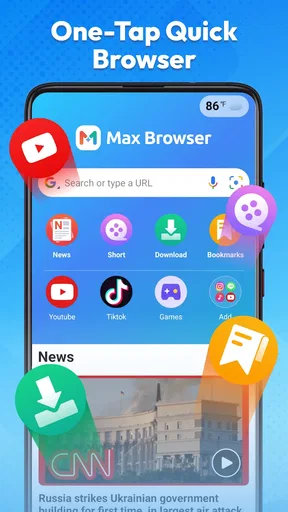
I judge a mobile browser less by promises of speed than by how little it interrupts a task. When I want to check a quick fact, open a news story, or look up the forecast, I don’t want to hunt through menus first. Max Browser - Fast & Easy is aimed at that kind of everyday browsing, with a pared-back interface and a focus on getting from a search to a page without much fuss.
That approach makes the most sense for people who want a straightforward browser rather than a full set of tools to configure. I’d consider it as a practical alternative for casual searches and short reading sessions, not automatically as a replacement for a browser where I already rely on saved settings, familiar account syncing, or a carefully organized bookmark library.
What “fast” means in everyday use
Speed is not just how quickly a page appears. It also means being able to find the search box, move between pages, and return to something I was reading without extra steps. The clean layout described in my experience is useful here: fewer visible controls can make a browser feel direct, especially when I’m using one hand or checking something while doing another task.
There is a trade-off, though. A minimal screen can feel refreshingly uncluttered, but people who want immediate access to many controls may prefer a more configurable browser. I would give the interface a short trial with my normal mix of searches, news, and everyday sites before deciding whether its simplicity suits me. A browser that feels quick for one search may not be the best fit for someone managing many tabs or relying on a detailed workflow.
A realistic day with search, news, and weather
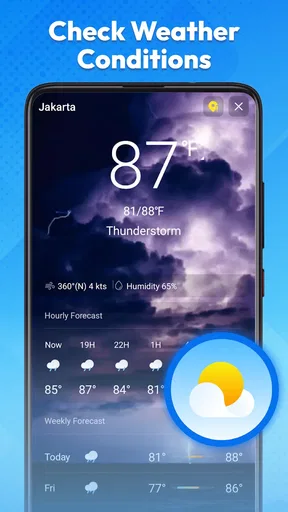
Imagine leaving home and wanting to check whether rain is expected, then searching for the opening hours of a nearby place and reading a news article while waiting. Those are the kinds of brief jobs for which a simple browser can be useful: each task starts with a search or page, and I can move on without first setting up a complicated workspace. The app’s focus on browsing, private search, news, and weather makes that mix especially relevant to its intended use.
A small habit can make these quick sessions more reliable: finish one task before opening several unrelated pages. That keeps the browsing session easier to follow and makes it less likely that I lose the page I meant to return to. If I do need to compare information, I’d keep the sources close together and check the details on the original pages rather than treating a search result or headline as the final word.
Privacy tools need sensible expectations
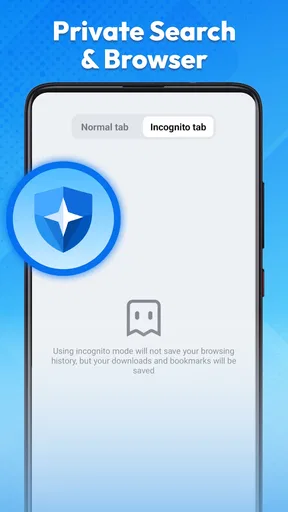
Incognito Mode is useful when I don’t want a browsing session saved in the usual local history, but I wouldn’t treat it as complete anonymity. Private browsing is a convenience for keeping separate searches from appearing in the browser’s ordinary history; it does not, by itself, mean that every other party involved in reaching a website cannot see activity. That distinction matters if privacy is the main reason you’re choosing a browser.
Worth Reading Before You Choose

EA SPORTS FC Mobile 26 Is a Bigger Football Game, but It Takes Time

Flipboard Shows What News Apps Must Do Beyond the Feed

Switching to Android Auto Means Rethinking Your Driving Routine

Google Calendar Makes a Crowded Week Easier to Manage

Ludo King Makes the Most of the Minutes Between Plans

Baby Panda World Brings Quick Play to Modern Phones, but Its Game Library Feels Busy
The ad blocker can also make pages less distracting, which is a real benefit when a site is crowded with interruptions. Still, blocking can occasionally affect how a page behaves, so if a site’s controls or content seem to be missing, I’d try opening that page without the blocker before assuming the site itself is broken. Night Mode is a similarly practical option for late reading, though a darker display is a comfort preference rather than a guarantee of reduced eye strain for everyone.
Who may prefer another browser
If your current browser is already tied closely to your devices, account, bookmarks, and passwords, switching your main setup may cost more convenience than this app’s simpler presentation gives back. I’d also look elsewhere if I needed extensive interface customization or depended on a particular advanced feature in another browser. A focused tool can be pleasant precisely because it does less, but that same restraint will not suit every browsing routine.
For occasional browsing, a secondary browser can be a sensible middle ground. I could use it for quick searches or a separate casual session while keeping my established browser for work, saved logins, or longer research. That split avoids the pressure to migrate everything at once and gives me a fair way to see whether the lighter approach actually fits my habits.
Speed and Simplicity at Its Core
Let me dive right into the heart of what makes Max Browser - Fast & Easy such a gem. The speed. Seriously, it's like this app was designed to teleport you across the web. Page loads are quick, and switching between tabs is a breeze. It's got this minimalist design that doesn’t clutter your screen with unnecessary buttons and menus, which is perfect if you want to keep things straightforward.
Intuitive Interface
The interface is super intuitive. Whether you're tech-savvy or just someone who occasionally browses the web, you'll find it easy to navigate. Everything is where you’d expect it to be, and there’s a certain elegance in its simplicity. It's like having a personal online assistant that just knows what you need.
Features That Matter
Now, let’s talk features. It’s not overloaded with stuff you’ll never use, but it has the essentials that make browsing enjoyable. It includes:
- Ad Blocker: No more pesky ads ruining your experience.
- Incognito Mode: Browse without leaving a trail. Perfect for when you want to keep things private.
- Night Mode: Save your eyes during those late-night browsing sessions.
I found these features to be quite handy, especially the ad blocker. It’s like having a VIP pass through the internet!
Performance and Compatibility
Performance-wise, this browser is a beast. Whether you’re on Android or iOS, it runs smoothly without any hiccups. They’ve optimized it well, making sure it doesn’t drain your battery like some other browsers out there. Oh, and it doesn’t gobble up your data either, which is a huge plus if you’re not always on Wi-Fi.
A Few Thoughts
Alright, so while I’m pretty impressed, I did notice a couple of things. The app could use a few more customization options for those who love to tweak their browsing experience. But hey, if you’re all about speed and ease, this might not even be a big deal for you.
As a tools app from devBroodyy, Max Browser is free and currently at version 1.2.0. Its 4.8 average from around 14,000 ratings, alongside over 1 million installs, suggests that many people have found a reason to try it, though popularity alone can’t tell me whether its browsing style will suit your routine. It is rated for teens, was released on September 16, 2025, and requires Android 8.0 or later. Those details make the Android fit clear; I would still check the relevant app store for the device I plan to use rather than assume every platform has the same availability or behavior.
On an older or entry-level phone, I’d keep expectations practical. A simple interface may feel less demanding than a browser crowded with panels, but real-world responsiveness can still depend on the device, connection, and pages being opened. Pages packed with media or scripts can take longer in any browser. If the app feels sluggish, I’d first compare the same page under the same connection and close tabs I no longer need before blaming the browser itself.
For heavy use, the useful question is not whether a browser can open several tabs, but whether I can keep track of them without making the phone feel harder to use. The reported smooth tab switching is encouraging for ordinary browsing, but I wouldn’t treat it as proof that unlimited tabs are comfortable. When researching a purchase, for example, I’d open only a few comparison pages, note the key details, and close the pages that no longer matter. That workflow is easier to manage and makes it simpler to return to the information I actually need.
Recovery matters too. If a page stops responding or a session gets interrupted, the simplest troubleshooting sequence is to reload the page, check the connection, and reopen the browser if needed. I would avoid assuming that a private session is meant to preserve a long research trail; incognito browsing is better for short, separate tasks than for work I expect to revisit. For anything important, I’d keep the relevant page or information in a place I already trust rather than relying on memory.
Choosing it over familiar alternatives
Compared with a default browser that is deeply woven into a phone’s accounts and saved information, Max Browser’s appeal is its direct, less cluttered style and its included ad blocker, Incognito Mode, and Night Mode. A mainstream browser may still be the better everyday home if seamless syncing, familiar settings, or a larger set of established tools matters more to you. I see the choice less as a contest over which browser is universally faster and more as a decision about whether a focused browsing experience is worth keeping alongside the one you already use.
It is also not the right pick if your priority is a highly tailored interface. The limited customization I noticed is a genuine compromise: fewer things to adjust can make starting easier, but it leaves less room to shape the browser around personal habits. If you like fine-tuning layouts and controls, test that part early rather than waiting until you have moved your routine over.
My performance verdict
For quick searches, casual news reading, and brief visits to everyday sites, I find the simple approach appealing. The browser’s stated emphasis on speed and its uncluttered feel support that use, while the privacy and display modes add practical options without turning the experience into a settings project. I’d start with short tasks, see how it handles the sites I visit most, and only then decide whether it deserves a place as my main browser.
People who need a dependable home for long research sessions should test their own habits rather than rely on a general impression of speed. Try reopening the pages you use often, switching between a few tabs, and checking whether the controls feel comfortable on your device. If those ordinary actions work smoothly for you, the app’s simplicity is a real strength; if you need deeper customization or tightly integrated account features, your current browser may remain the more practical choice.
All in all, Max Browser - Fast & Easy is a solid choice for anyone looking to zip around the web without fuss. It's got the essentials nailed down, and the performance is top-notch. Give it a try, and it might just become your go-to browser!
Pros
- Lightning-fast page load times.
- User-friendly interface for easy navigation.
- Built-in ad blocker enhances browsing.
- Secure browsing with privacy features.
- Supports multiple tabs efficiently.
Cons
- Occasional crashes on older devices.
- Limited customization options.
- Some ads bypass the blocker.
- No night mode feature available.
- Bookmarks management needs improvement.
FAQs for Max Browser - Fast & Easy
What makes Max Browser stand out from other mobile browsers?
Max Browser is designed with speed and simplicity in mind. Its lightweight framework ensures faster page loading times, even on slower networks. Additionally, it offers a user-friendly interface with customizable features, making it easy to navigate and personalize according to your browsing needs. Security features like ad-blockers and privacy controls further enhance the user experience.
Does Max Browser support extensions or add-ons?
Currently, Max Browser focuses on delivering a streamlined experience, so it does not support extensions or add-ons. However, it comes equipped with built-in features such as an ad-blocker and privacy protection tools. These built-in functionalities aim to reduce clutter and boost performance while ensuring user privacy and security.
Is Max Browser available for both Android and iOS devices?
Yes, Max Browser is available for both Android and iOS platforms. The app has been optimized to perform efficiently across different devices, ensuring a consistent browsing experience. Users can download it from the Google Play Store for Android devices or the Apple App Store for iOS devices.
How does Max Browser handle user privacy and data security?
Max Browser places a strong emphasis on user privacy and data security. It includes features like private browsing mode, which prevents the tracking of your online activities. Additionally, it offers built-in tools to block harmful ads and trackers, ensuring that your data remains secure while you browse the internet.
Are there any in-app purchases or subscription fees associated with Max Browser?
Max Browser is free to download and use, with no hidden subscription fees. While it offers a fully functional experience without any cost, there may be optional in-app purchases for premium features or customization options. These purchases are entirely optional and not necessary for basic browsing functionality.


